


Table of Contents
Introduction (The Real Problem Most Beginners Face)
Let’s be honest.
Most people want to start a YouTube channel, but they stop before they even begin.
Why?
Because they think they need:
- A camera
- Good lighting
- Editing skills
- Confidence to show their face
- Expensive software
So they quit before they upload anything.
But here’s the truth most people are still ignoring in 2026:
You don’t need to show your face to build a successful YouTube channel anymore.
With free AI video tools, you can now create full videos without filming anything at all. No camera. No mic setup. No studio.
And that’s exactly what this guide will show you.
We’ll break down How to Use Free AI Video Tools to Create a Faceless YouTube Channel, step-by-step, in a way even a complete beginner can follow.
What Is a Faceless YouTube Channel Using AI Video Tools?
A faceless YouTube channel is simply a channel where you don’t appear on camera.
Instead, you use:
- AI-generated voiceovers
- Stock footage or animations
- Text-to-video tools
- AI script writers
Now combine that with free AI video tools, and you can automate most of the content creation process.
In simple terms:
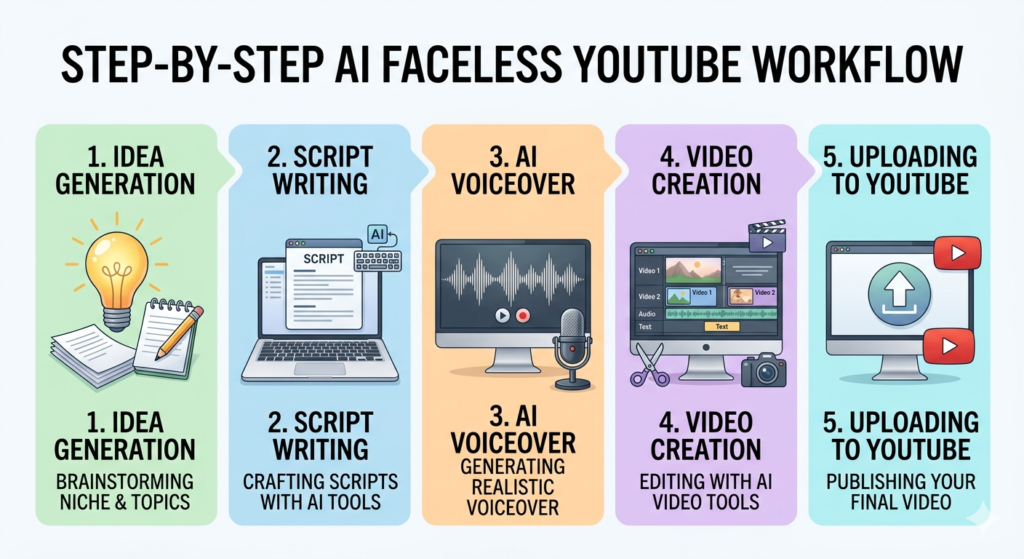
You type an idea → AI writes the script → AI creates voice/video → You upload
That’s it.
Pro Tip
Don’t overcomplicate it. The biggest mistake beginners make is thinking they need “perfect videos.” You don’t. You need consistency first, quality later.

Why This Matters (And Why Most People Fail Without AI)
If you ignore this approach, here’s what usually happens:
- You spend weeks learning video editing
- You burn out before uploading 5 videos
- You compare yourself to big YouTubers
- You quit
But with AI video tools:
- You reduce production time by 80%
- You eliminate technical barriers
- You focus only on ideas and consistency
Here’s the catch…
Most people still use AI tools the wrong way. They think AI will “do everything.”
It won’t.
AI is an assistant, not a business owner.
Pro Tip
Treat AI like a “content partner,” not a magic button. The creators who win are the ones who guide AI properly, not rely on it blindly.
Step-by-Step Guide: How to Use Free AI Video Tools to Create a Faceless YouTube Channel
Now let’s get practical.
This is the exact workflow many faceless channels use today.
Step 1: Choose a Profitable Channel Niche
Before tools, you need direction.
Pick a niche that works well for faceless content:
- Motivation & self-improvement
- Finance tips
- Tech tutorials
- AI tools breakdown
- Facts & storytelling channels
Pro Tip
Avoid overly saturated entertainment niches at the beginning. Go where value content wins, not viral chaos.
Step 2: Generate Video Ideas Using AI
Use free AI tools like:
- ChatGPT
- Google Gemini
- Notion AI (free tier)
Ask for:
- 30 video ideas in your niche
- Trending topics in your category
- SEO-friendly titles
Example prompt:
“Give me 20 faceless YouTube video ideas about AI tools for beginners.”
Pro Tip
Don’t copy viral titles blindly. Twist them slightly to add curiosity. That’s what gets clicks.
Step 3: Write Scripts with AI (But Don’t Be Lazy)
Now take your idea and turn it into a script.
Use AI tools like:
- ChatGPT (best free option)
- Copy.ai (free tier)
Structure your script like:
- Hook (first 10 seconds)
- Problem
- Solution
- Steps
- Call to action
Pro Tip
Here’s a mistake most beginners make: they accept AI scripts without editing.
Bad idea.
Always rewrite the first 5–10 lines to sound more human and emotional.
Step 4: Turn Script into Voiceover
Now you need audio.
Free AI tools:
- ElevenLabs (free tier)
- CapCut text-to-speech
- Narakeet
Choose:
- Human-like voice
- Clear pacing
- Neutral accent (unless niche-specific)
Pro Tip
Avoid robotic voices. Even if they’re free, they kill watch time instantly.
Step 5: Create the Video Using AI Tools
This is where the magic happens.
Free AI video tools:
- CapCut (best beginner tool)
- Pictory AI (free trial)
- InVideo AI (limited free use)
- Canva video editor
You simply:
- Add script voiceover
- Add stock videos or AI visuals
- Add subtitles
- Add transitions
Done.
Pro Tip
Don’t over-edit. Clean and simple videos often perform better than flashy ones.
Step 6: Optimize for YouTube SEO
This step is where most faceless channels fail.
You must optimize:
- Title (include keyword naturally)
- Description
- Tags
- Thumbnail
Your keyword here:
How to Use Free AI Video Tools to Create a Faceless YouTube Channel
Pro Tip
Your thumbnail matters more than your video quality at the beginning. Focus on curiosity, not design perfection.
Step 7: Upload and Stay Consistent
Upload your video.
Then repeat.
That’s the real system.
No shortcut replaces consistency.
Best Free AI Video Tools You Can Use
Here are practical tools you can start with today:
1. CapCut
Best all-in-one beginner video editor.
2. ChatGPT
For scripts, ideas, SEO titles.
3. Canva
Great for thumbnails and animations.
4. Pictory AI
Turns scripts into videos automatically.
5. ElevenLabs
Human-like AI voiceovers.
Pro Tip
Don’t jump between tools too much. Pick 2–3 and master them first.
Common Mistakes Beginners Make
Let’s be real. Most people fail because of simple mistakes.
1. Over-editing videos
They waste time trying to make Hollywood-level content.
2. Ignoring storytelling
AI tools can’t fix boring scripts.
3. Posting randomly
No consistency = no algorithm trust.
4. Copying competitors directly
YouTube detects recycled ideas easily.
Pro Tip
If your video is “too perfect,” it often performs worse than a natural, slightly imperfect one.Pro Tips (Real-World Experience Insights)
Here are insights most beginners never hear:
- Upload 10–15 videos before judging results
- Focus on retention, not views
- Study comments more than analytics
- Improve one thing per video (not everything at once)
- Your first 30 videos are “training videos,” not “money videos”
Conclusion
Learning How to Use Free AI Video Tools to Create a Faceless YouTube Channel is no longer complicated.
You don’t need expensive gear.
You don’t need editing skills.
You don’t even need to show your face.
What you do need is:
- A clear niche
- Simple tools
- Consistent uploads
- Smart use of AI
Start small. Stay consistent. Improve gradually.
Because the truth is simple:
AI doesn’t replace creators — it amplifies them.
Internal Linking Ideas (for your blog)
- “Best Free AI Tools for Beginners in 2026”
- “How to Start a YouTube Channel Without Showing Your Face”
- “YouTube SEO Guide for Beginners”
External Authority References (names only)
- YouTube Creator Academy
- Google Trends
FAQs
1. Can I really create a YouTube channel without showing my face?
Yes. Faceless channels use AI voiceovers, stock footage, and animations instead of personal filming.
2. Are free AI video tools enough to get started?
Yes. Free tools like CapCut and ChatGPT are enough to build your first videos.
3. How long does it take to make one AI video?
Usually 30 minutes to 2 hours depending on complexity.
4. Do faceless channels make money?
Yes, but only if you focus on consistency, SEO, and value content—not shortcuts.
5. What is the best free AI video tool for beginners?
CapCut is the easiest starting point for beginners.
Related article https://imamudigitalhub.com/how-to-use-free-ai-digital-marketing-tools-to-make-money-online-beginner-guide-2026/